
Sebagian besar perusahaan memiliki data yang berasal dari berbagai sumber dan format, mulai dari POS, e-commerce, CRM, hingga database internal. Tantangannya, proses penggabungan dan pembersihan data yang masih dilakukan secara manual, memakan waktu, rawan error, dan sering menjadi hambatan terbesar bagi tim BI dan analis data. Akibatnya, insight bisnis menjadi terlambat, laporan tidak konsisten, dan proses analitik berjalan lambat karena beban ETL yang tidak efisien.
AWS Glue hadir sebagai solusi untuk menghilangkan bottleneck tersebut. Dengan kemampuan serverless ETL, otomatisasi data discovery, transformasi data skala besar, hingga integrasi dengan S3, Athena, dan QuickSight, AWS Glue membuat seluruh proses integrasi data menjadi otomatis dan lebih terstruktur. Artikel ini akan menjadi panduan komprehensif dari dasar hingga praktik implementasi penuh AWS Glue sesuai kebutuhan operasional modern.
Apa itu AWS Glue?
AWS Glue adalah layanan ETL (Extract, Transform, Load) berbasis serverless yang memudahkan proses persiapan dan transformasi data. Dengan memanfaatkan Glue Crawler, Data Catalog, dan Glue ETL Jobs berbasis Apache Spark, perusahaan dapat mengotomatisasi integrasi data tanpa harus mengelola infrastruktur.
Empat komponen utama AWS Glue:
- Glue Crawler: mendeteksi struktur data secara otomatis
- Glue Data Catalog: repository metadata terpusat
- Glue ETL Jobs: menjalankan transformasi data skala besar
- Glue Studio: visual editor ETL tanpa coding
Mengapa Integrasi Data Tanpa AWS Glue Menjadi Tantangan?
Perusahaan yang belum menggunakan AWS Glue kerap menghadapi serangkaian kendala sebagai berikut.
Sulit Gabungkan Data dari Banyak Sumber
Format berbeda mulai dari CSV, JSON, database RDS sehingga membuat proses penggabungan menjadi makin rumit.
Proses Manual Rentan Error
Human error saat cleansing, mapping, dan merging data sehingga memengaruhi kualitas laporan.
ETL Mingguan Memperlambat Keputusan Bisnis
Tim data masih melakukan tugas secara manual sehingga tidak dapat memenuhi kebutuhan data bisnis secara real-time.
Infrastruktur ETL Tradisional Mahal dan Sulit Dikelola
Server on-premises untuk ETL membutuhkan biaya tinggi dan tidak scalable.
Panduan Lengkap Implementasi AWS Glue
Untuk mengatasi tantangan di atas, AWS Glue hadir sebagai solusi dengan otomasi penuh. Berikut langkah-langkah implementasi AWS Glue.
1. Skenario Kasus: Integrasi Data Multi-Source
Contoh umum pada perusahaan ritel di mana data POS dalam format CSV, data e-commerce dalam format JSON, data CRM dalam database Amazon RD, dan proses manual minggual untuk menggabungkan data. Dibutuhkan solusi ETL otomatis untuk mengintegrasi data harian menggunakan AWS Glue untuk Data Lake di Amazon S3.
2. Arsitektur Cloud Data Pipeline
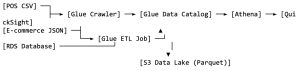
Alur kerja utama:
- Data dari berbagai sistem (POS, e-commerce, CRM) masuk ke S3.
- Glue Crawler akan mendeteksi schema dan katalog struktur data secara otomatis. ‘
- Data Catalog akan menyimpan metadata untuk semua table.
- Glue ETL kemudian mentransformasi data ke format optimal (Parquet).
- S3 Data Lake menjadi storage terpusat untuk kebutuhan analitik
- Athena melakukan query untuk menganalisis SQL
- QuickSight menampilkan dashboard business intelligence dan visualisasi analitik
3. Prerequisites
- Akun AWS dengan akses ke Glue, S3, RDS, dan Athena.
- Data source sudah tersedia (CSV, JSON, dan RDS)
- S3 bucket untuk Data Lake
- IAM roles untuk Glue dengan permission yang disesuaikan
4. Langkah-langkah Implementasi AWS Glue
Perlu dicatat panduan ini fokus pada implementasi data POS (CSV) untuk demo praktis. Konsep yang sama dapat direplikasi untuk data e-commerce (JSON) dan CRM (RDS) sesuai arsitektur yang dijelaskan.
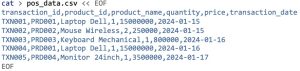
Persiapan: Membuat Dummy Data
Sebelum memulai diperlukan sample data untuk demo ETL, contohnya dummy data CSV (POS).
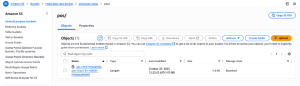
Langkah 1: Setup Storage di Amazon S3
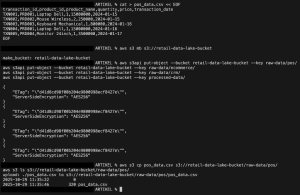
Amazon S3 menjadi fondasi Data Lake karena menyediakan storage yang scalable dan cost-effective untuk menyimpan data dalam berbagai format. Dengan struktur folder raw-data/ dan processed-data/ maka data yang di-upload ke folder raw-data akan diproses Glue.
- Buat S3 bucket untuk Data Lake
aws s3 mb s3://retail-data-lake-bucket
- Buat folder struktur untuk data ingestion
aws s3api put-object –bucket retail-data-lake-bucket –key raw-data/pos/
aws s3api put-object –bucket retail-data-lake-bucket –key raw-data/ecommerce/
aws s3api put-object –bucket retail-data-lake-bucket –key raw-data/crm/
aws s3api put-object –bucket retail-data-lake-bucket –key processed-data/
- Upload dummy data
aws s3 cp pos_data.csv s3://retail-data-lake-bucket/raw-data/pos/
Langkah 2: Konfigurasi Security dengan IAM Role
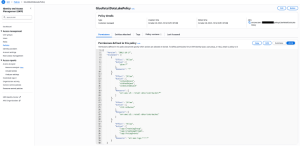
IAM Role memberikan permission yang diperlukan untk AWS Glue mengakses berbagai layanan AWS secara aman. Diperlukan specific permission untuk bucket yang sudah dibuat.
Buat IAM Policy
Buat IAM Role
Role akan digunakan oleh Crawler dan ETL Job.
- IAM Console > Create Role
- AWS Service > Glue > Next
- Attach policy yang sudah dibuat
- Role name: GlueRetailDataLakeRole
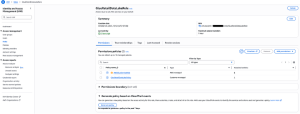
Keuntungan specific policy:
– Principle of least privilege
– Hanya akses ke bucket tertentu
– Lebih aman untuk production
Permissions yang diperlukan:
- glue:*: akses penuh ke layanan Glue
- s3:GetObject/PutObject/DeleteObject: Read/write across ke specifik bucket
- S3:ListBucket: List contents bucket
- logs:*: Monitoring dan troubleshooting
Langkah 3: Otomatisasi Data Discovery dengan Glue Crawler
Glue Crawler secara otomatis men-scan data sources, mendeteksi schema, dan membuat table definitions di Data Catalog untuk menghilangkan kebutuhan manual mapping schema.
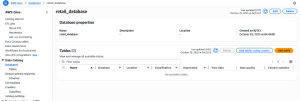
Buat Database
Database digunakan untuk menyimpan metadata tabel dalam Data Catalog.
- AWS Glue Console > Database > Add database
- Database name: retail_database
- Create
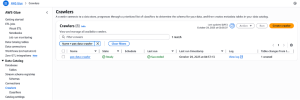
Buat Crawler
Crawler men-scan folder S3 secara otomatis.
- Crawlers > Create Crawler
- Crawler name: pos-data-crawler
- Next
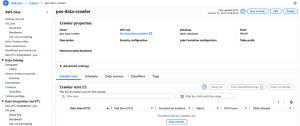
Konfigurasi Data Source
- Add a data source
- S3
- S3 path:s3://retail-data-lake-bucket/raw-data/pos
- Add an S3 data source
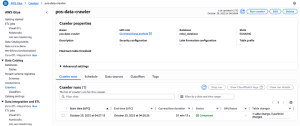
Run Crawler
Schema data otomatis terdeteksi dan tersimpan sebagai table di Data Catalog.
- Select IAM role: GlueRetailDataLakeRole
- Target database: retail_database
- Create Crawler dan Run

Perlu dicatat bahwa tutorial pembuatan Crawler ini menggunakan AWS Console. Untuk production environment dengan multiple data sources dapat mengotomatisasi pembuatan Crawler menggunakan Python SDK.
Contoh implementasi via Python SDK (Opsional)
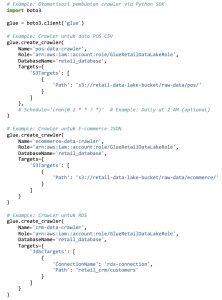
Langkah 4: Transformasi Data dengan Glue ETL Pipeline
Glue ETL Jobs menggunakan Apache Spark untuk memproses data berskala besar. Jobs akan mengonversi data dari format CSV/JSON ke Parquet yang lebih optimal untuk analitik
Create Visual ETL Job
Gunakan Glue Studio untuk membuat ETL secara visual.
- ETL Jobs > Visual ETL
- Create
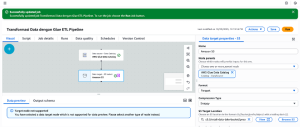
Configure Source dan Target
- Source > AWS Glue Data Catalog
- Database: retail_database, Table: pos
- Target > Amazon S2
- Format: Parquet
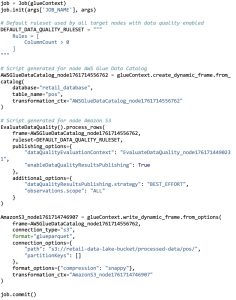
- S3 path:s3://retail-data-lake-bucket/processed-data/pos
Job Configuration
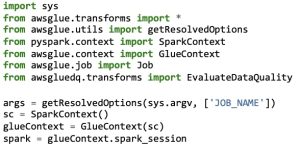
Glue ETL mengubah data dari CSV menjadi Parquet yang lebih efisien dan siap untuk analisis.
- Job details tab
- Name: retail-etl-job
- IAM Role: GlueRetailDataLakeRole
- Save dan Run
ETL Script (auto-generated oleh Visual ETL)
Langkah 5: Automasi ETL Pipeline dengan CloudWatch Events (Optional)
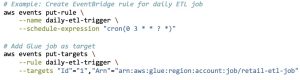
Tutorial ini menjalankan ETL Job secara manual untuk kebutuhan demo. Pada production environment dapat mengotomatisasi penjadwalan ETL Jobs menggunakan CloudWatch Events. CloudWatch Events memungkinkan penjadwalan otomatis ETL Jobs, menggantikan proses manual dengan automation yang reliable.
Contoh implementasi scheduling (opsional):
Via AWS Console:
- Amazon EventBridge Console > Rules > Create rule
- Schedule > Cron experssion: set setiap hari jam 03.00 pagi
- Target > AWS Glue Job > select: retail-etl-job
- Create rule
Via AWS CLI:
Keuntungan Automation:
- Konsistensi data processing
- Mengurangi human error
- Monitoring dan alerting otomatis
- Eksekusi otomatis setiap hari pada jam yang telah ditentukan
Langkah 6: Analytics dengan Amazon Athena
Amazon Athena adalah serverless query service yang memungkinkan analisis data langsung di S3 menggunakan SQL standar, tanpa perlu setup infrastruktur.
Setup Athena
- Amazon Athena Console
- Set query result location:s3://retail-data-lake-bucket/athena-results/
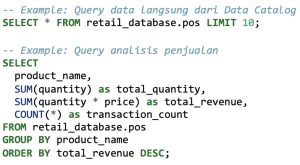
Query Data dari Data Catalog
Contoh SQL Queries
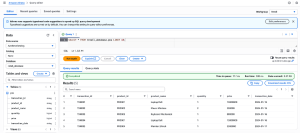
Amazon Athena Console Interface:
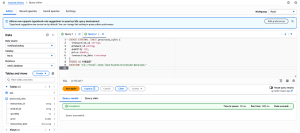
Eksekusi query SQL di Amazon Athena:
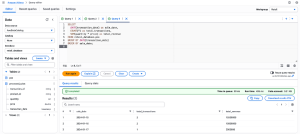
Hasil query analisis data penjualan:
Langkah 7: Visualisasi dengan Amazon QuickSight
Amazon QuickSight adalah business intelligent service untuk membuat dashboard interaktif dan visualisasi data bagi stakeholder bisnis.
Setup QuickSight Data Source
- Amazon QuickSight Console > Datasets > New dataset
- Athena sebagai data source
- Database: ritel_database
- Table: pos atau hasil query Athena
Buat Dashboard Analisis
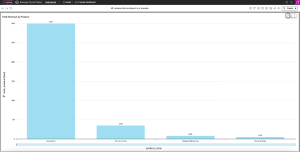
Rekomendasi dashboard pertama – vertical bar chart:
- Pilih visual type: vertical bar chart
- Buat calculated field
- Configure chart
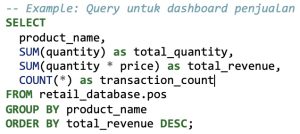
Visualisasi yang Dapat Dibuat
- Bar chart: revenue per produk
- Line chart: tren penjualan harian
- Pie chart: distribusi penjualan per kategori
- KPI cards: total revenue, transaksi, produk terlaris
Keuntungan QuickSight:
- Dashboard interaktif untuk pengguna bisnis
- Auto-refresh dari data source
- Visualisasi mobile-friendly
- Fitur sharing dan kolaborasi
Monitoring dan Troubleshooting
Setelah menerapkan langkah-langkah implementasi, Anda dapat memonitor dan melakukan troubleshooting.
CloudWatch Metrics
- Monitor Glue job success/failure rates
- Track data processing times
- Set up alerts untuk job failures
Best Practices
- Partitioning: gunakan partisi data berdasarkan tanggal untuk performa query lebih baik
- Compression: aktifkan kompresi Snappy untuk Parquet file
- Schema Evolution: gunakan Glue Schema Registry untuk mengelola perubahan schema
- Cost Optimization: gunakan Spot instances untuk Glue Jobs yang tidak itime-critical.
Hasil dan Manfaat
Setelah proses implementasi AWS Glue, Anda akan mendapatkan:
- Proses ETL otomatis harian
- Data terstruktur dan tersedia dalam format Parquet
- Metadata terpusat di Glue Data Catalog
- query real-time via Athena
- Visualisasi data dengan QuickSight
Estimasi Biaya
Contoh estimasi kasar untuk data volume 100GB/bulan (US East region). Biaya aktual bervariasi berdasarkan region, usage pattern, dan konfigurasi. Estimasi yang lebih akurat sesuai kebutuhan spesifik Anda dapat merujuk pada AWS Pricing Calculator.
– Glue Crawler: ~$10/bulan
– Glue ETL Jobs: ~$50/bulan
– S3 Storage: ~$25/bulan
– Athena Queries: ~$15/bulan
Total: ~$100/bulan
Kesimpulan
AWS Glue adalah solusi integrasi data serverless yang powerfull untuk mengintegrasikan hingga memproses data multi-source secara otomatis, scalable, dan cost effective. Dengan panduan praktis di atas, perusahaan dapat membangun data lake modern yang cepat dan siap untuk analitik lanjutan dan Machine Learning. Mengotomatiskan ETL pipeline membantu perusahaan untuk:
- Menghemat waktu: proses manual mingguan ke otomatis harian.
- Mengurangi human error: eliminasi kesalahan manual saat data processing.
- Mempercepat insights: time-to-insight lebih cepat untuk business intelligence.
- Skalabilitas: handle volume data yang terus bertambah.
- Cost effective: model pay-per-use tanpa infrastructure overhead.
Implementasi AWS Glue memberikan fondasi solid untuk modern data analytics dan inisiatif Machine Learning.
Jika Anda ingin mengimplementasikan AWS Glue secara efektif, tim expert Central Data Technology (CDT) siap membantu Anda. Klik link berikut untuk konsultasi lebih lanjut.
Penulis: Muhammad Valen
Editor: Ervina Anggraini – Content Writer CTI Group