
Analyzing large volumes of data often requires a powerful data warehouse. However, managing infrastructure, scaling compute resources, and maintaining clusters can be complex. This is where Amazon Redshift with the serverless option becomes useful.
With Redshift Serverless, you can run analytics workloads without provisioning or managing servers. The platform automatically handles infrastructure management, scaling, and resource allocation so you can focus on analyzing your data instead of maintaining systems.
In general, the workflow for getting started with Redshift Serverless includes:
- Creating a serverless data warehouse.
- Connecting to the environment.
- Loading sample datasets.
- Running queries to analyze the data.
Create an AWS Account
Before using Redshift, you need an account in Amazon Web Services.
If you don’t have an account yet:
- Open https://portal.aws.amazon.com/billing/signup
- Follow the online instructions.
When you sign up for an AWS account, an AWS account root user is created. The root user has access to all AWS services and resources in the account. As a security best practice, assign administrative access to a user, and use only the root user to perform tasks that require root user access.
Create a Data Warehouse with Redshift Serverless
Once your AWS account is ready, the next step is to create a serverless data warehouse environment.
Steps to get started:
- Sign in to the AWS Management Console.
- Open the Amazon Redshift console at https://console.aws.amazon.com/redshiftv2/
- Choose Try Redshift Serverless Free Trial.
- Select Use default settings.
- Click Save configuration to create the environment.
Default Settings for Amazon Redshift Serverless:
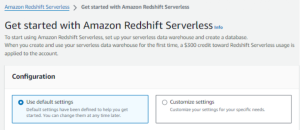
When you create a serverless configuration, AWS automatically provisions two main components:
- Namespace a logical container that stores database objects such as schemas, tables, users, and snapshots.
- Workgroup a collection of compute resources used to process queries and perform analytics tasks.
After the setup process is completed, your serverless namespace and workgroup will appear in the Redshift dashboard, indicating that your data warehouse is ready to use.
Load Sample Data
After creating your data warehouse environment, the next step is to load sample data so you can start experimenting with queries.
You can do this using the built-in query interface.
Steps:
- In the Redshift console, select Query data to open Query Editor v2.
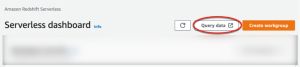
- The query editor will open in a new browser tab.
- Connect to the available workgroup.
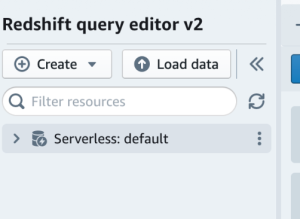
- Choose an authentication method to access the environment.
- Expand the database called sample_data_dev.
- Select one of the available datasets and open the sample notebook.
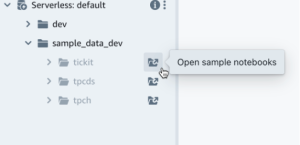
A SQL notebook allows you to organize multiple SQL commands and documentation in a single environment. It helps you run queries step by step while keeping notes and explanations together.
If this is your first time loading sample data, the system may prompt you to create a sample database before continuing.
Run Sample Queries
Once the sample dataset is loaded, you can start exploring the data using Amazon Redshift Serverless queries.
In the Amazon Redshift Serverless notebook:
- Open the sample queries that are automatically provided.
- Click Run all to execute the queries.
- View the results directly in the query editor.
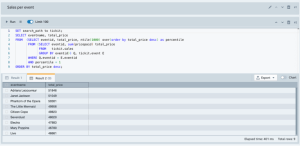
The query editor allows you to review the results in several ways. For example, you can:
- Display results in a table format
- Export the results as CSV or JSON files
- Visualize the data using charts
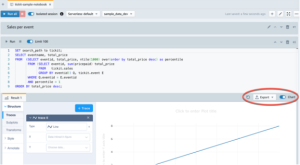
This makes it easier to analyze datasets and understand patterns within your data.
Load Data from Amazon S3
In addition to sample datasets, you can also load your own data into Redshift. One common method is importing files stored in Amazon S3.
To load data from Amazon S3:
- Create an IAM role that allows Redshift to access your S3 bucket.
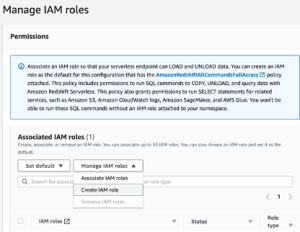
- Choose the level of S3 bucket access that you want to grant to this role, and choose Create IAM role as default.
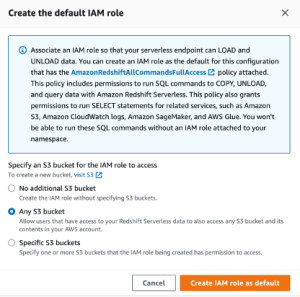
- Choose Save changes. You can now load sample data from Amazon S3.
The following steps use data within a public Amazon Redshift S3 bucket, but you can replicate the same steps using your own S3 bucket and SQL commands.
Load sample data from Amazon S3
- In query editor v2, choose + Add, then choose Notebook to create a new SQL notebook.
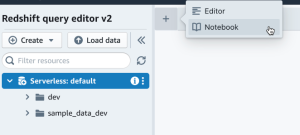
- Switch to the dev database.
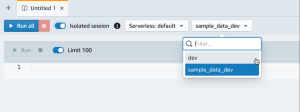
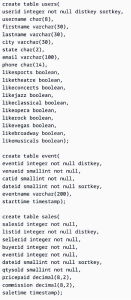
- Create tables.
If you are using the query editor v2, copy and run the following create table statements to create tables in the dev database.
- In the query editor v2, create a new SQL cell in your notebook.
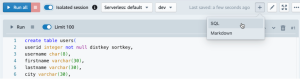
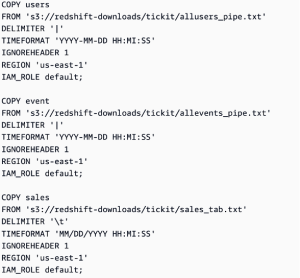
- Now use the COPY command in query editor v2 to load large datasets from Amazon S3 or Amazon DynamoDB into Amazon Redshift. For more information about COPY syntax, see COPY in the Amazon Redshift Database Developer Guide. You can run the COPY command with some sample data available in a public S3 bucket. Run the following SQL commands in the query editor v2.
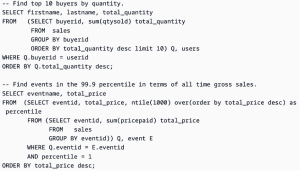
- After loading data, create another SQL cell in your notebook and try some example queries. For more information on working with the SELECT command, see SELECT in the Amazon Redshift Developer Guide. To understand the sample data’s structure and schemas, explore using the query editor v2.
Credit to AWS Documentation